 Peter BittnerandAustin Horstman
c51ac59e59
Peter BittnerandAustin Horstman
c51ac59e59
Add programs.uv.python.{versions,default,prune} and
programs.uv.tool.{packages,prune} to install uv-managed Python versions
and tools during activation.

Install requests are passed verbatim to uv. Unpinned entries track the
latest release on each activation while pinned ones stay put: Python
requests without a patch component are installed with `uv python install
--upgrade` (exact patches, which uv refuses to upgrade, get a plain
install), and tools are refreshed with `uv tool upgrade <packages>`
scoped to the configured list. Both upgrades are scoped to the managed
entries, so installs Home Manager does not own are left untouched. prune
makes a set declarative by running `uv ... uninstall --all` before
reinstalling the listed entries.

The activation blocks run after linkGeneration so uv sees the freshly
linked uv.toml, and a null programs.uv.package is rejected once the
module emits activation commands.
Home Manager using Nix
This project provides a basic system for managing a user environment using the Nix package manager together with the Nix libraries found in Nixpkgs. It allows declarative configuration of user specific (non-global) packages and dotfiles.
Usage
Before attempting to use Home Manager please read the warning below.
For a systematic overview of Home Manager and its available options, please see:
If you would like to contribute to Home Manager, then please have a look at "Contributing" in the manual.
Releases
Home Manager is developed against the nixpkgs-unstable branch, which often
causes it to contain tweaks for changes/packages not yet released in stable
NixOS.
To avoid breaking users' configurations, Home Manager is released in branches
corresponding to NixOS releases (e.g. release-26.05). These branches get
fixes, but usually not new modules. If you need a module to be backported, then
feel free to open an issue.
Words of warning
Unfortunately, it is quite possible to get difficult to understand errors when working with Home Manager. You should therefore be comfortable using the Nix language and the various tools in the Nix ecosystem.
If you are not very familiar with Nix but still want to use Home Manager then you are strongly encouraged to start with a small and very simple configuration and gradually make it more elaborate as you learn.
In some cases Home Manager cannot detect whether it will overwrite a previous manual configuration. For example, the Gnome Terminal module will write to your dconf store and cannot tell whether a configuration that is about to be overwritten was from a previous Home Manager generation or from manual configuration.
Home Manager targets nixpkgs-unstable and NixOS version 26.05 (the current
stable version), it may or may not work on other Linux distributions and NixOS
versions.
Now when your expectations have been built up and you are eager to try all this out you can go ahead and read the rest of this text.
Contact
You can chat with us on IRC in the channel #home-manager on OFTC. There is also a Matrix room, which is bridged to the IRC channel.
Installation
Home Manager can be used in three primary ways:
-
Using the standalone
home-managertool. For platforms other than NixOS and Darwin, this is the only available choice. It is also recommended for people on NixOS or Darwin that want to manage their home directory independently of the system as a whole. See "Standalone installation" in the manual for instructions on how to perform this installation. -
As a module within a NixOS system configuration. This allows the user profiles to be built together with the system when running
nixos-rebuild. See "NixOS module" in the manual for a description of this setup. -
As a module within a nix-darwin system configuration. This allows the user profiles to be built together with the system when running
darwin-rebuild. See "nix-darwin module" in the manual for a description of this setup.
Home Manager provides both the channel-based setup and the flake-based one. See Nix Flakes for a description of the flake-based setup.
Translations
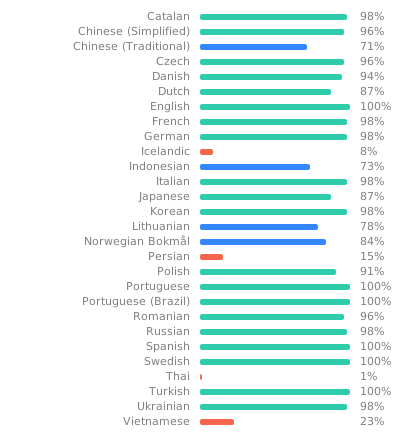
Home Manager has basic support for internationalization through gettext. The translations are hosted by Weblate. If you would like to contribute to the translation effort then start by going to the Home Manager Weblate project.
License
This project is licensed under the terms of the MIT license.